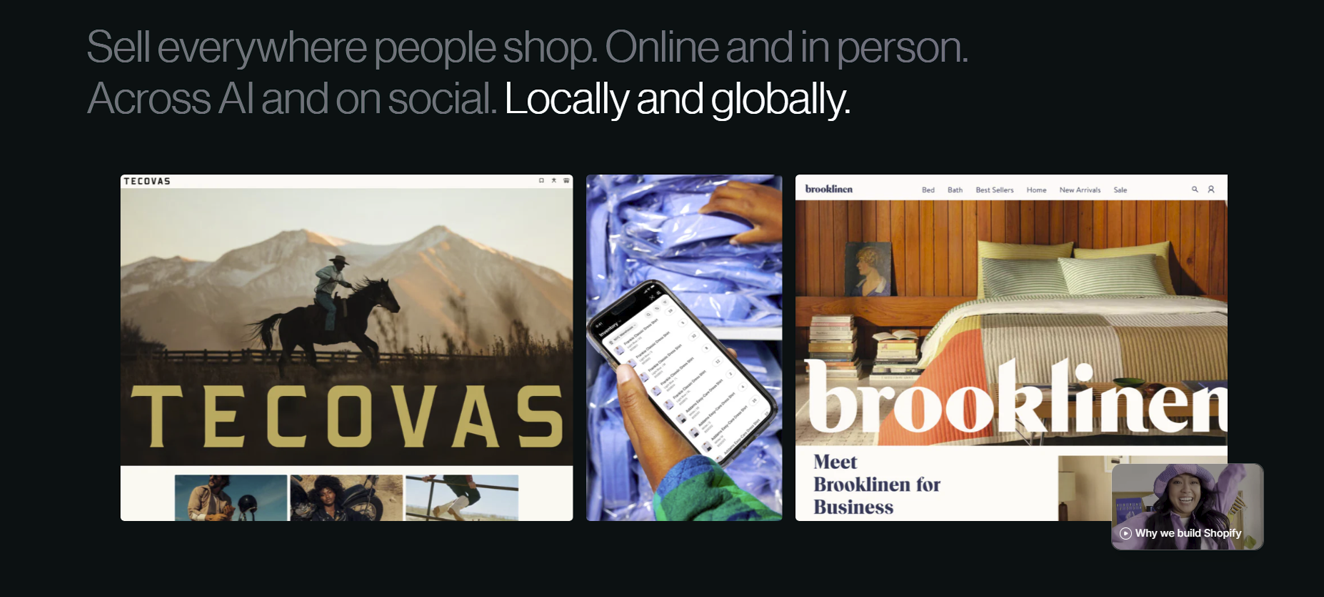
If you’ve been thinking about starting an online store, chances are you’ve already come across the name Shopify. And probably a few others too — like WooCommerce, Amazon, and Adobe Commerce — all promising to help you sell online. But a few questions might come up, like “what is Shopify?” And what’s the actual difference between building your own online business from scratch and using an ecommerce platform like Shopify to do it for you?
That’s exactly what I want to clear up. I’ll try to break it all down in plain, everyday language. And any time a slightly technical word comes up, like “cloud-based,” I’ll stop and explain what it actually means in simple terms, so nothing feels confusing. By the end, you’ll have a much clearer picture of what Shopify is, how ecommerce platforms actually fit in, and which path makes the most sense for your first online store.
Key takeaways
- Shopify is a cloud-based, all-in-one commerce platform that lets you build an online store and sell online, in person, and across social media.
- It runs on a subscription model, with plans starting at $5/month (Starter) and scaling up to enterprise-level Plus plans.
- It’s a legitimate, publicly traded company that powers millions of businesses worldwide.
- The real monthly cost is usually higher than the base plan once you add apps, a domain, and payment processing fees — most small stores land around $50–$300/month.
- Shopify is beginner-friendly and scales as you grow, which is why it’s one of the most popular ecommerce platforms for new online sellers (and in my personal opinion, it earns that spot).
What is Shopify?
Shopify is a commerce platform that lets anyone create an online store and sell products without needing to write code or hire a developer.
Think of it as an all-in-one toolkit: it handles your website, your product pages, your shopping cart, your checkout, and your payments, all in one place.
The process is fairly simple: you sign up for a plan, set up your online store, and start promoting it. I’ll walk through the basic steps later in this guide.
Where does Shopify actually fit? Simple examples
Example 1 — You make your own products.
Say you make candles at home. You take photos of them, then use Shopify to build a website, list each candle with a price, and add a checkout button. A customer visits your store, adds a candle to their cart, and pays. Everything from the online shop to the moment the money is collected — the website, the cart, the checkout — that’s Shopify. Once the order comes in, you pack the candle and ship it yourself (Shopify can even print the shipping label for you). The making and the shipping are yours; the selling happens on Shopify.
Example 2 — You source products from a vendor.
Now say you don’t make anything yourself — you find a supplier that already has products, and you sell those. You list the supplier’s products on your Shopify store with your own prices. A customer buys and pays through your store, exactly like before. The only thing that changes is fulfillment: either you bought stock from the vendor ahead of time and ship it yourself, or — with dropshipping — you forward the order to the vendor and they ship it straight to your customer, so you never touch the product.
Notice that in both cases Shopify’s role is identical: it’s the online store and checkout that connects your product to your customer and collects the payment. What changes is only where the product comes from and who ships it — not what Shopify does.
It’s a software-as-a-service (SaaS) platform, which means you pay a recurring subscription fee to use it rather than buying and maintaining your own software. It’s also cloud-based and fully hosted, so you can manage your store, orders, and inventory from any device with an internet connection — Shopify takes care of the servers, security, and updates behind the scenes.
Cloud-based: Cloud-based means the software runs on the internet rather than on your own computer, so there’s nothing to download or install. Your store and all its data live on Shopify’s computers, and you just log in through a web browser to manage it from any device.
Founded in 2006 and headquartered in Ottawa, Canada, Shopify has grown into one of the largest ecommerce platforms in the world, powering millions of businesses across more than 175 countries. It’s a publicly traded company (you’ll find it on the New York and Toronto stock exchanges under the ticker SHOP), and it serves everyone from first-time sellers running a side hustle to massive global brands.
In short: if you want to sell something online — physical products, digital downloads, services, or subscriptions — Shopify gives you the infrastructure to do it.
Is Shopify legit? Yes, Shopify is completely legitimate. It’s a well-established, publicly traded company that has powered millions of stores for nearly two decades with secure, PCI-compliant payments — though keep in mind that how trustworthy any individual store is still depends on the merchant running it.
How does Shopify work?
At its core, Shopify works on a subscription model. You pay a monthly fee, and in return you get access to a hosted online store and all the tools needed to run it. Here’s how the main pieces fit together.
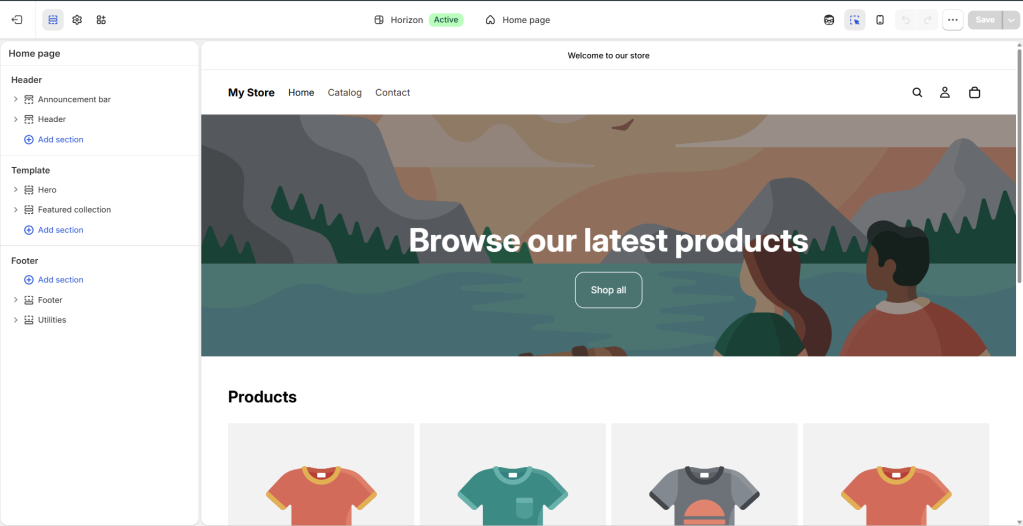
Building your store. You start by signing up and choosing a theme — a pre-designed template that controls how your store looks. Shopify offers hundreds of mobile-friendly themes you can customize with your branding, colors, and logo using a drag-and-drop editor, no coding required. There are also built-in AI tools (Shopify Magic and the Sidekick assistant) that can help you generate store designs, write product descriptions, and create content. Take a look at the Shopify Theme Store if you want a quick browse.
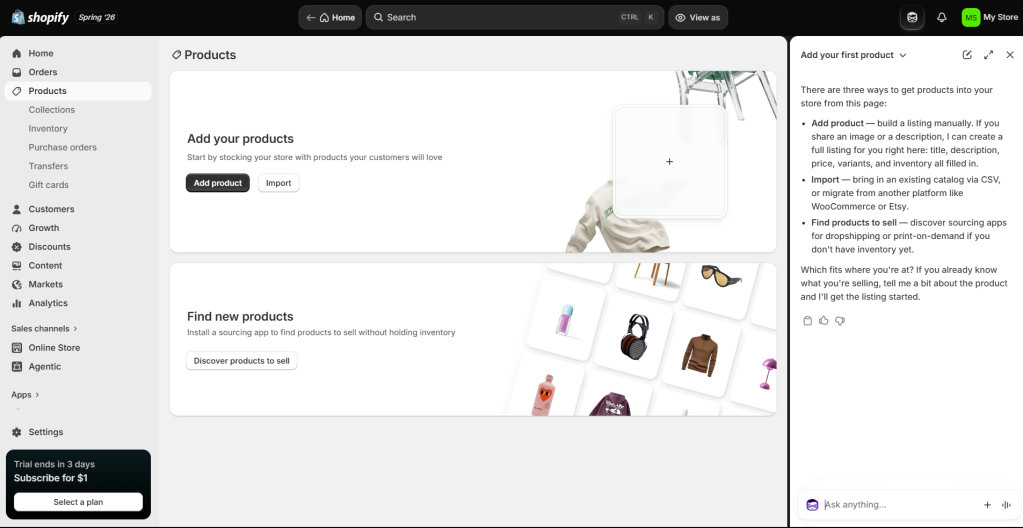
Adding products and getting paid. Next, you add your products — photos, descriptions, prices — and organize them into collections. When a customer checks out, Shopify Checkout processes the payment securely and accepts all major payment methods from day one. You can also turn on Shop Pay, Shopify’s accelerated checkout, which lets returning shoppers buy in a single tap and can boost your conversions.
Fulfilling orders. When an order comes in, Shopify helps you print shipping labels, provide tracking, and access discounted shipping rates (up to 88% off with carriers). As you grow, the Shopify Fulfillment Network connects you with third-party logistics partners who can store and ship your inventory for you.
Selling everywhere. Your store isn’t limited to your website. You can sell across social platforms like Instagram and TikTok, on marketplaces like Amazon and Etsy, and in person using Shopify’s point-of-sale (POS) system — all synced in one dashboard. One thing worth noting: Shopify is actively updating its system to help merchants sell through AI tools like ChatGPT and Gemini, too.
Extending with apps. The Shopify App Store offers thousands of third-party apps for everything from building your storefront to email marketing, reviews, loyalty programs, and dropshipping — so you can add almost any feature your store needs. In fact, this partner ecosystem is one of Shopify’s biggest strengths. As they scale up, store owners can get a lot of help from third-party apps or even certified Shopify agency partners.
Behind all of this, Shopify quietly handles the technical heavy lifting most people never want to deal with: secure hosting, fast loading speeds, software updates, inventory tracking, tax calculations, and analytics that show how your store is performing.
What can you sell on Shopify?
One of Shopify’s strengths is flexibility — it’s not just for physical goods. You can sell:
- Physical products — anything from handmade jewelry to furniture
- Digital products — e-books, online courses, music, and downloads
- Services and consulting — coaching, professional advice, or appointments
- Print-on-demand items — custom apparel and decor printed only when ordered
- Subscriptions and memberships — recurring boxes or members-only access
- Ticketed experiences — workshops, classes, and events, online or in person
- Rentals — short-term rentals or event supplies
A few categories are restricted, so it’s worth checking Shopify’s acceptable use policy before you list anything unusual.
💡 What is Shopify dropshipping? Dropshipping means selling products without keeping any stock yourself. When a customer orders from your Shopify store, a supplier ships the product straight to them, so you only pay for it after you’ve made the sale. You connect to suppliers through an app like DSers or Printful. It’s a low-cost, beginner-friendly way to start, though margins tend to be thin and competition is high.
How much is a Shopify store? (2026 pricing)
Shopify offers several subscription tiers. Here’s how the main US plans look in 2026 (prices vary by country, and paying annually typically saves you around 25%):
| Plan | Monthly Cost | Staff Accounts | Best For |
|---|---|---|---|
| Starter | $5/month | — | Selling via social media and links, not a full store |
| Basic | $39/month (≈$29 billed annually) | 0 (owner only) | New stores and first-time sellers |
| Grow* | $105/month (≈$79 billed annually) | 5 | Growing businesses that need more features |
| Advanced | $399/month (≈$299 billed annually) | 15 | Established merchants with higher volume |
| Plus | From ~$2,300/month | Unlimited | Large and enterprise-level businesses |
*The Grow plan was previously just called the “Shopify” plan, so you may still see it referred to that way.
New merchants usually get a free trial (currently 3 days) followed by an introductory rate of just $1/month for the first three months while they set up.
But the subscription is only part of the picture. Here’s what else factors into the real cost of running a store:
- Payment processing fees. Every card payment includes a processing fee. With Shopify Payments, online rates run from about 2.9% + 30¢ per transaction on Basic down to roughly 2.5% + 30¢ on Advanced. If you use a third-party payment provider instead, Shopify adds a small extra fee on top — so most sellers stick with Shopify Payments where it’s available.
- Apps. Most stores install a few apps to add functionality, ranging from free to $50+ per month each.
- Theme. Shopify offers free themes, but premium themes are a one-time purchase, usually $100–$400.
- Domain name. A custom web address (like yourbrand.com) costs around $10–$20 per year.
When you add it all up, a typical small Shopify store costs somewhere in the range of $50 to $300 per month to run, depending on your apps and sales volume. You can absolutely start lean — the Basic plan plus a free theme and a domain is enough to launch — and scale your spending as your business grows.
Shopify vs. other platforms: Why choose Shopify?
Shopify isn’t the only way to sell online.
Here’s how it stacks up against the alternatives beginners most often compare it to:
| Platform | What it is | Best for |
|---|---|---|
| Shopify | Your own standalone, fully branded store | Building a brand you control and scaling it over time |
| Amazon | A giant marketplace where you list alongside others | Instant access to a huge audience, without building a brand |
| Etsy | A marketplace for handmade and vintage goods | Crafters and casual sellers who want built-in traffic |
| Wix | A general website builder with ecommerce features | Simple sites; fewer apps and integrations than Shopify |
The key distinction: with Amazon or Etsy, you’re essentially renting space inside someone else’s marketplace and selling alongside competitors. With Shopify, you build and own your own brand and customer relationships. Marketplaces give you instant visibility but little control; Shopify gives you control but means you’re responsible for driving your own traffic.
Shopify also tends to win on extensibility — its app store (8,000+ apps) and payment gateway options (100+) far outnumber what builders like Wix offer, and it has no product or bandwidth limits even as you scale.
Is Shopify Worth It?
Whether Shopify is worth it depends on your goals, but for most people who are serious about selling online, the answer leans yes. Here’s an honest look at both sides.
What makes Shopify worth it:
It’s genuinely beginner-friendly — you can build a professional-looking store without any technical skills. It handles all the security, hosting, and updates for you, so you can focus on selling rather than maintenance. It scales smoothly from a tiny side project to a large operation, its POS system unifies online and in-person sales, and its enormous app ecosystem means you can add almost any feature you need. You also get reliable customer support and a huge community of guides and resources.
The trade-offs to consider:
The costs add up once you start adding apps and paying transaction fees, so it’s not the cheapest option out there. If you use a payment provider other than Shopify Payments, you’ll pay extra fees. While the platform has solid built-in SEO basics, it offers less SEO flexibility than some competitors. And although you can customize a lot without code, deeper design changes may require some technical knowledge or a developer. Email hosting also isn’t built in, so you’ll need a third-party service for branded email addresses.
For comparison, free or self-hosted options like WooCommerce can cost less, but put far more of the technical burden on you. Shopify’s appeal is that it trades a bit of cost for a lot of convenience and reliability.
If you value getting to market quickly with a polished, dependable store — and you’d rather spend your time on products and marketing than on managing servers — Shopify is well worth the investment.
How to get started with Shopify
Getting your first store live is more straightforward than most people expect. Here’s the basic path:
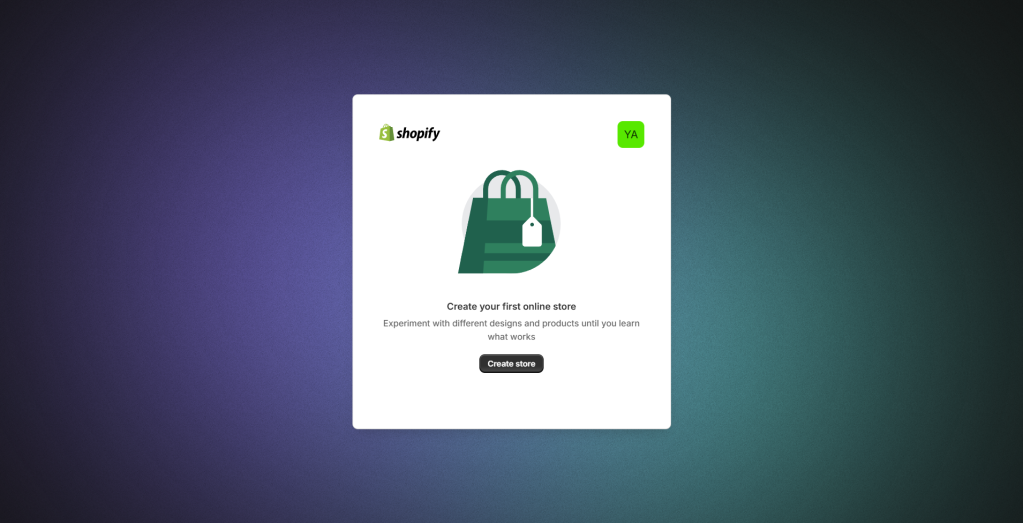
- Sign up and pick a plan.
Start with the free trial so you can explore without committing. Beginners usually start on Basic; the Starter plan works if you just want to sell through social links.
- Choose and customize a theme. Pick a theme that suits your products, then add your logo, colors, and branding with the drag-and-drop editor.
- Add your products. Upload photos, write descriptions, set prices, and organize everything into collections.
- Set up payments, checkout, shipping, and domains. Turn on Shopify Payments, set up your checkout page, shipping rates, and domain, and run a test order.
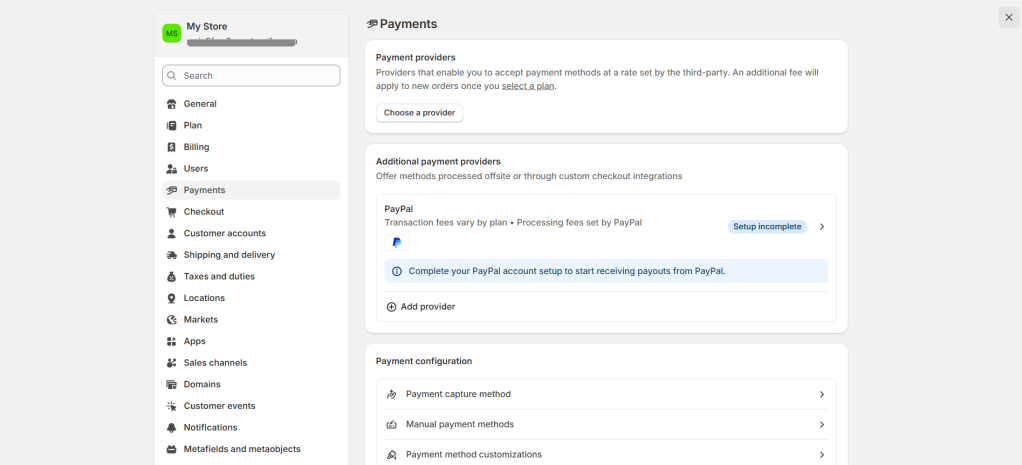
- Launch and start marketing. Connect your sales channels, then drive traffic through SEO, social media, email, and ads.
Final thoughts: Getting started
Shopify is, at its heart, a way to turn an idea into a real online business without the technical headaches. It handles the complicated parts of ecommerce so you can focus on what matters: finding products people want and getting them in front of customers.
The best way to find out if it’s right for you is to try it. Shopify offers a free trial, so you can build out a sample store, explore the dashboard, and get a feel for the platform before committing to a paid plan. Start small, learn as you go, and scale up when you’re ready.
Frequently asked questions
- Is Shopify good for beginners? Yes. Shopify is built so that people with no technical background can launch a store using drag-and-drop themes and AI tools, and you can accept payments immediately with its built-in processor.
- Is Shopify free? No, but it offers a free trial, and new users can typically run their store for just $1/month for the first three months. After that, you choose a paid plan starting at $5/month.
- How much does a Shopify store really cost? The plan itself starts at $5–$39/month for most beginners, but factoring in apps, a domain, and payment processing fees, most small stores spend roughly $50–$300/month in total.
Prices and plan details mentioned here reflect 2026 US pricing and may vary by region. Always check Shopify’s official pricing page for the latest figures before signing up. Company and sales figures are drawn from Shopify’s published reports.
Leave a Reply