TL;DR: The short answer to how to spy on competitor Shopify stores is to start free: add /products.json to the store’s address, sort its catalog by best-selling and look up its ads in the Meta Ad Library. Two test orders placed 14 days apart give a rough order count, because Shopify numbers orders in sequence from #1001. Paid tools like Koala Inspector, Minea and Sell The Trend do the same work at scale, but their revenue figures are modeled estimates. If you are checking three to five competitors once, you do not need a subscription.
Why most “Shopify spy tool” lists are written by the tools themselves
Search this topic and the first page is mostly vendors reviewing their own category. In September 2026, five of the organic results came from PPSPY, Minea, TrendTrack, SpySales and ZIK Analytics. Each one ranks its own product first. None of them says up front that it is the vendor.
Reddit sits at #3, which tells you what searchers want: someone who has done this, not someone selling it. Only one independent guide made the top 10. Its tool list leans on general SEO tools like Ahrefs and Moz, not on Shopify-specific methods.
That does not make the vendor lists wrong on every point. It does mean every “best shopify spy tool” ranking you read came from a company with a stake in the answer. We have a stake too, which is why the disclosure sits above this section and the free methods come first.
What you can and cannot learn when you spy on Shopify stores
A Shopify storefront shows more than most owners realize, and less than the tool ads suggest. Here is the split.
| What you can see directly | What you can only estimate |
|---|---|
| Every published product, price and variant | Revenue |
| When each product was added or updated | Profit margin |
| Crossed-out “compare at” prices | Ad spend |
| Ads running right now on Facebook and Instagram | Conversion rate |
| The theme and many installed apps | Traffic |
| Order numbers on your own test purchases | Exact order volume |
The left column is public data you can read yourself. The right column is what spy tools sell as their headline feature. It is always a model built from public signals, which is how Koala Inspector describes its own figures. Keep that in mind when a dashboard tells you a store makes $84,000 a month.
How to spy on competitor Shopify stores for free
Five methods cover most of what a new store owner needs. None of them costs money except the last, which costs two small purchases.
Read their catalog with products.json
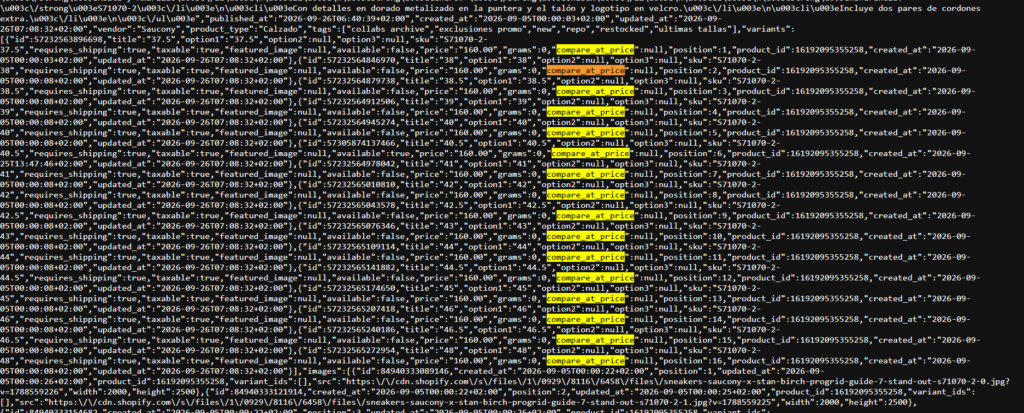
Type the store’s domain followed by /products.json into your browser, for example competitorstore.com/products.json. On most Shopify stores you get a raw feed of the public catalog. No login or key is needed. We tried it on a large Shopify brand in September 2026 and it returned the full product record.
Four groups of fields are worth reading:
- Launch dates:
created_atshows when each product went live in the catalog. Sort by it to see what they added this month. - Discount strategy:
compare_at_priceis the crossed-out price on each variant. If most products carry one, the store runs a permanent sale. - Price bands and stock: Each variant’s
priceandavailablefields show what they charge and what is sold out. - Positioning:
tags,vendorandproduct_typeshow how they group the catalog, and sometimes which brand they resell.
The feed returns up to 250 products per page, so a store with 1,000 products takes four pages. Add ?limit=250&page=2 to see the next batch. A browser extension that formats JSON makes it much easier to read.
Know the limits. Some large stores block or rate-limit the feed. Inventory counts are usually missing, and there is no currency field, so check prices against the storefront. Nothing here tells you what sells, only what is listed.
See their best sellers with the storefront sort
On most Shopify stores, adding /collections/all?sort_by=best-selling to the domain lists the catalog in Shopify’s best-selling order. It is the closest thing to a sales ranking you will get without paying for a tool.
Treat the order as rough. We could not find Shopify documentation on how the sort is weighted. Some stores also hide the all-products collection. If that happens, try the same sort on their main collection pages.
Cross-check it with the catalog feed. A product that is new in /products.json and already near the top of the best-seller list is worth a closer look.
Check their theme and apps
Open the store, right-click and choose View Page Source, then search for “theme”. Most Shopify stores name their theme somewhere in the source. App scripts often show up too, as file names or domains you can search for. Free lookup sites like BuiltWith, and browser extensions like Koala Inspector, read the same source and list what they recognize.
Two caveats apply. Some merchants install anti-spy apps from the Shopify App Store to hide their theme and apps from inspectors. More important, a theme is rarely why a store sells. Copying it mostly tells you what they spent on the storefront.
Find their ads in the Meta Ad Library
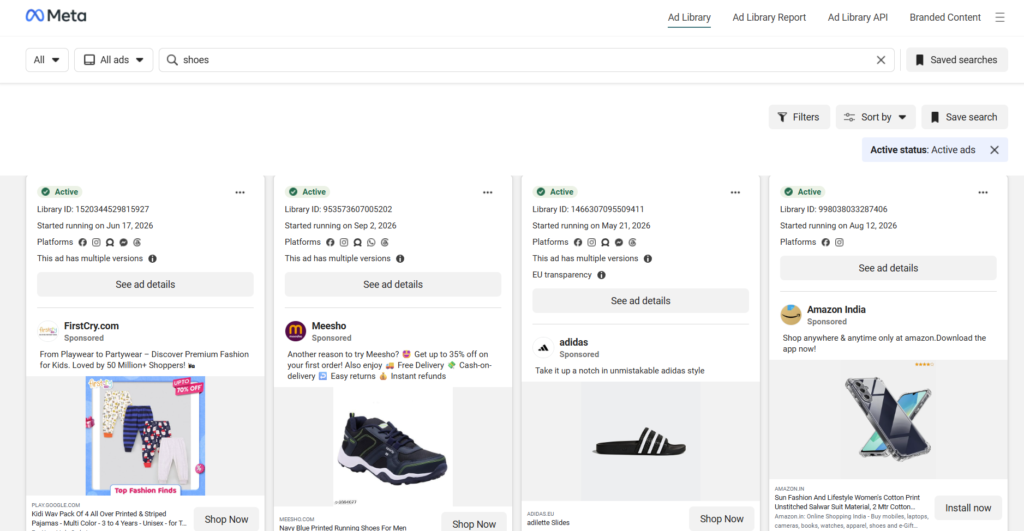
Search the store’s brand name or Facebook page in Meta’s Ad Library. You will see the ads the page is running right now on Facebook and Instagram, with start dates and creative.
The limits matter more than the features:
- Active ads only. Outside the EU, commercial ads disappear from the library once they stop running.
- No spend. Meta shows no spend figures for commercial ads anywhere.
- EU ads show more. Ads served in the EU add reach and demographic breakdowns, and stay visible for about a year.
Age is the useful signal. An ad that has run for 30 days or more usually means the store thinks it is working. That is an inference, not proof, but it beats guessing. Look for the oldest active creative on the products you found in the catalog.
Estimate order volume with order numbers
Shopify numbers orders in sequence. The first order is #1001, and each new order adds one. Merchants can add a prefix or suffix, but Shopify’s Help Center says the starting number itself cannot be changed.
That gives you a crude counter. Buy something cheap from the competitor today and note the order number. Two weeks later, buy again and subtract.
Say your first order is #4812 and the second, 14 days later, is #5233. Orders #4813 to #5232 belong to other customers, so that is 420 orders in 14 days, or 30 a day. If their average product sells for $35, that is about $14,700 over two weeks, before refunds, discounts and shipping. Your first number also says they had taken about 3,800 orders before you bought. For how long a new store usually takes to reach numbers like that, see our realistic dropshipping timeline.
Now the caveats. The count includes every order on every channel, including point of sale, draft orders and canceled orders. It counts orders, not revenue. It also costs you two purchases and a two-week wait.
How accurate are Shopify spy tools?
Shopify spy tools are less accurate than their marketing suggests, and nobody outside the store can check their numbers. Every revenue or traffic figure a spy tool shows is an estimate. Koala Inspector says so plainly on its own page: its sales and traffic figures are “estimates modeled from public signals rather than the store’s private backend.”
Some tools advertise high accuracy rates. Independent reviewers say real-world accuracy is much lower. No vendor publishes a method you can test, so treat every Shopify spy number as a relative signal. Store A looks bigger than store B. A product seems to be climbing. That is the level of confidence the data supports.
Do not plan a budget around a tool’s revenue figure. A store that looks busy today may not last. Our success rate guide explains why many do not, using data on dropshipping success rates.
Shopify spy tools compared
Here is what each Shopify spy tool adds over the free methods, using prices from each vendor’s own pricing page in September 2026.
| Tool | Free option | Starting price | What it adds over the free methods | Best for |
|---|---|---|---|---|
| Koala Inspector | 15 lookups a month, no card | $22/month Premium (220 lookups, 50 tracked stores) | One-click theme, apps, best sellers and estimated sales for the store you are viewing | Checking a handful of stores as you browse |
| Sell The Trend | 14-day trial | $29.97/month Lite ($19.97/month billed annually) | Store Intelligence estimates for traffic, orders, revenue and bestsellers; 5 uses a day on Lite, unlimited from Essential | Sellers who want store lookups inside a wider product research tool |
| Minea | Not shown on the pricing page | $49/month Starter ($39/month billed quarterly) | Shop listings on every plan, unlimited from Premium ($99/month) | Tracking many stores over time |
The cheapest paid option for store lookups is Sell The Trend Lite at $19.97 a month on annual billing, and Koala Inspector’s free plan covers 15 lookups a month at no cost. Over a year, that is $264 for Koala Premium, $239.64 for Sell The Trend Lite on annual billing, and $468 to $588 for Minea Starter.
Pricing notes
Minea’s pricing page lists Starter at $49, Premium at $99 and Business at $199 a month, with lower prices for quarterly billing. Several affiliate review sites quote different figures, including a $399 Business plan and a free tier. We use the vendor page here. Check it again at signup, because the two versions cannot both be current.
Sell The Trend’s pricing page offers a free trial. Several reviews say the trial still asks for a payment method, so expect that. We left PPSPY out of the table because we could not verify its current pricing.
Do you need a paid tool for Shopify competitor analysis?
Most new stores do not need a paid tool yet. If you are looking at three to five competitors to decide what to sell, the free methods give you the catalog, launches, prices, ads and a rough order count. None of that needs a subscription. Starting on a tight budget? Read how to start dropshipping with no money before adding any monthly fee.
A paid tool starts to earn its fee when:
- You track dozens of stores every week and want alerts when they launch something.
- You want to find stores you have never heard of, through their ads or products.
- Your hours are worth more than the monthly fee.
It does not pay when you have not launched yet, or when you are checking a few stores once. A $49 monthly tool is a real line item for a new store. Our startup cost guide covers the rest of that budget in How Much Does It Cost to Start a Shopify Store?
Want to try one anyway? Use the free tier first. Koala’s 15 lookups a month or Sell The Trend’s 5 a day on Lite are enough for a first pass. Cancel before a trial converts if the free methods already answered your question.
What to do with what you find
A tool list does not tell you what to sell. A worksheet does. Fill this in for each competitor.
| Question | Where to find it | What it tells you |
|---|---|---|
| What do they sell, and at what prices? | products.json | The price bands you would compete in |
| What did they launch in the last 30 days? | created_at in products.json | What they are testing now |
| Which products sell best? | Best-selling sort | Where their volume is |
| Which ads have run 30+ days? | Meta Ad Library | Angles they keep paying for |
| Do they discount everything? | compare_at_price | Whether you must match a “sale” price |
| Which theme and apps? | Page source, BuiltWith | What they spent on the storefront |
| Rough order volume? | Two test orders | Whether the niche has real demand |
Do it for three to five stores in the same niche. Patterns across stores matter more than any single store. If three competitors launched the same product type this month and all run ads for it, that is demand. If only one does, it may be a test.
What not to copy
Product photos and descriptions are protected by copyright. In the US, statutory damages run from $750 to $150,000 per work. Take the idea, then shoot your own photos and write your own copy.
A competitor’s best seller is also only worth copying if the margin survives your ad costs. Our high margin products guide covers which categories hold up, in High Margin Products for Dropshipping.
Where the line is
Everything in this guide on how to spy on competitor Shopify stores reads pages any shopper can see, at the speed a shopper would. That is ordinary competitive research.
Things change when you pull thousands of pages with a scraper, ignore a store’s terms of service, or reuse its photos and copy. Test purchases are real orders too, so place them honestly and in your own name.
This is not legal advice. If you plan to scrape at scale or reuse anything, read the store’s terms and talk to a lawyer first. For the rules on selling itself, see Is Dropshipping Legal?
FAQ
Legality and privacy
Is it legal to spy on competitor Shopify stores?
Reading a store’s public pages, product feed and active ads is ordinary competitive research, because any shopper can see them. The risk starts with bulk scraping against a store’s terms, or with copying photos and descriptions, which copyright protects. We are not lawyers, so check with one before scraping at scale.
Will a competitor know I looked at their store?
Not from a normal visit, which looks like any other visit in their analytics. A test purchase is different. It is a real order with your name and address on it.
Can a store hide its products.json from competitors?
Partly. Some large stores block or rate-limit the feed, and anti-spy apps hide the theme and installed apps from inspectors. The storefront itself stays visible, because customers need to see it.
What you can see
Can you see how much a Shopify store makes?
Not exactly. Revenue lives in the store’s private admin, which no outside tool can read. Spy tools estimate it from public signals, and the order-number method gives a rough order count, not revenue.
How do I know if a store is on Shopify?
Add /products.json to the domain, and a product feed usually means Shopify. The page source of a Shopify store also references cdn.shopify.com. Browser extensions like Koala Inspector detect it in one click.
Can you see what apps a Shopify store uses?
Often, yes. App scripts tend to appear in the page source, and tools like BuiltWith or Koala Inspector list the ones they recognize. Stores running an anti-spy app can hide some of them.
Tools
Is Koala Inspector free?
Yes, with limits. The free plan gives 15 lookups a month with no card required. Premium costs $22 a month for 220 lookups and up to 50 tracked stores.
What is the best Shopify spy tool for beginners?
Beginners do not need a paid tool at first. Use the free methods in this guide, then Koala Inspector’s free plan if you want the same data in one click. Pay for Sell The Trend or Minea only once you track many stores every week.
How often should you check competitor stores?
Check once before you pick a niche, then monthly for your three to five closest rivals. Weekly checks only make sense if you act on what you see that fast. That cadence is where a paid tool starts to earn its fee.
Leave a Reply